Implementation Guide
Installation Steps
- Open your Google Doc™ document
- Navigate to Extensions → Add-ons
- Search for "NUM2TEXT Docs" Add-on
- Click Install
- Refresh your Google Doc™
🌐 View on Google Workspace Marketplace
Or visit directly:
https://workspace.google.com/marketplace/app/num2text_docs/961575137401
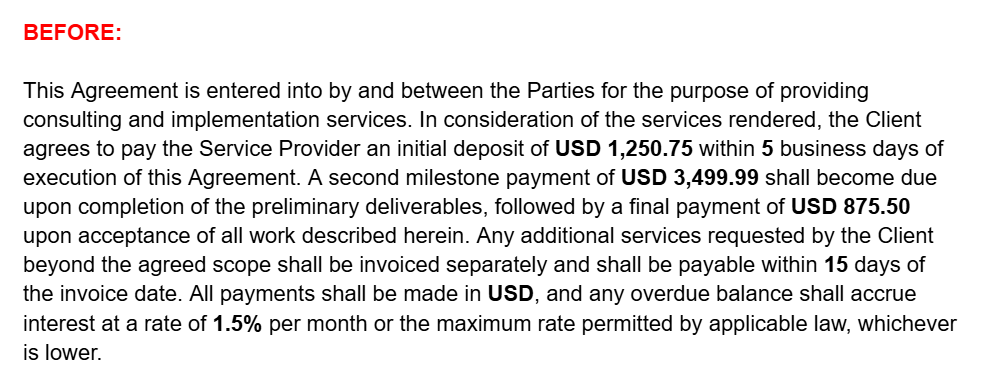
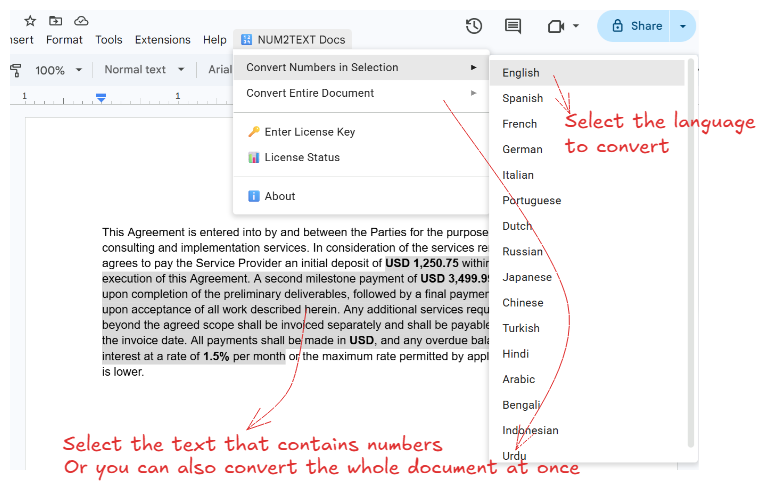
Method 1: Convert Selection
- Select the text containing numeric values
- Navigate and click to NUM2TEXT Docs → Convert Selection->Language in the menu bar
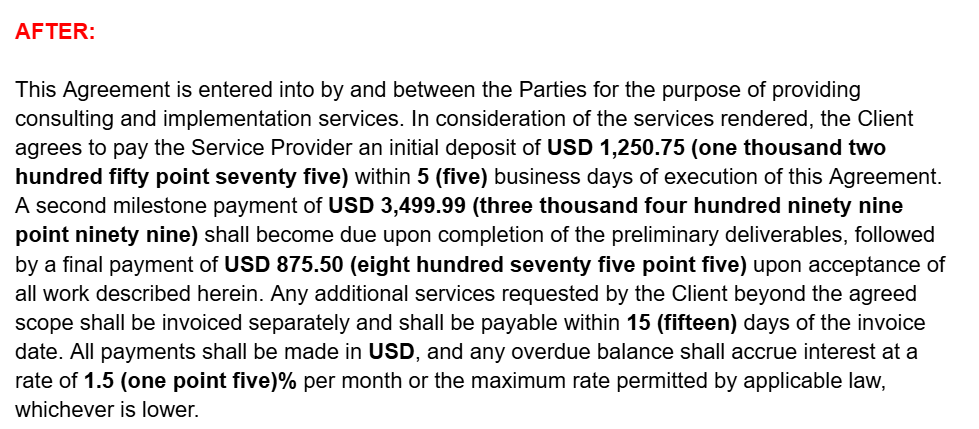
- Numbers will be replaced with their text equivalents in the selected language
Method 2: Convert Entire Document
Full Document Scan:
NUM2TEXT Docs → Convert Entire Document → Spanish
Automatically scans the entire document and annotates every number found with its Spanish word form.
Seamless Text Flow:
Example: "I have 5 apples" → "I have 5 (five) apples"
Maintains your document formatting while adding text annotations directly into sentences.
Skip Already Annotated:
"We have 42 (forty two) items" → No double conversion
Smart engine recognizes if a number has already been annotated to prevent duplicates.
Language Reference
| Code |
Language |
Example (42) |
| en |
English |
forty two |
| es |
Spanish |
cuarenta y dos |
| fr |
French |
quarante-deux |
| de |
German |
zweiundvierzig |
| it |
Italian |
quarantadue |
| pt |
Portuguese |
quarenta e dois |
| nl |
Dutch |
tweeënveertig |
| ru |
Russian |
сорок два |
| ja |
Japanese |
よんじゅうに |
| zh |
Chinese |
四十二 |
| tr |
Turkish |
kırk iki |
| hi |
Hindi |
बयालीस |
| ar |
Arabic |
اثنان و أربعون |
| bn |
Bengali |
বিয়াল্লিশ |
| id |
Indonesian |
empat puluh dua |
| ur |
Urdu |
بیالیس |
Frequently Asked Questions
Does this add-on require an internet connection?
No. All conversions are processed locally within your Google Docs™ using Google Apps Script. After
initial installation, no internet connection is required for the conversion functionality.
What is the maximum supported number range?
The add-on supports numbers up to billions. For example, 1,234,567,890 converts to "one billion two
hundred thirty four million five hundred sixty seven thousand eight hundred ninety" in English.
How many decimal places are supported?
The system supports up to 3 decimal places with full precision. Numbers with more than 3 decimal
places will be automatically rounded to 3 digits before conversion.
Are negative numbers supported?
Yes. The add-on fully supports negative numbers and applies the appropriate negative prefix
according to each language's conventions (e.g., "negative" in English, "menos" in Spanish, "eksi" in
Turkish).
Does it overwrite my original numbers?
No. The add-on safely appends the written text in parentheses right after your original number,
keeping your original data intact.
Can collaborators use this add-on in shared documents?
Yes. Once installed in a document, all collaborators with edit permissions can use the add-on.
However, users must install the add-on individually to use it in their own new documents.
What happens with invalid input?
Non-numeric inputs return "Invalid number" as the error message. Non-numeric text remains untouched.
It specifically looks for digit patterns.
Is there a limit on batch conversion size?
There is no hard limit, though very large documents (hundreds of pages) may require several seconds
to process. For optimal performance with large datasets, consider converting in smaller batches.
Can conversions be reversed?
Yes. Use Google Docs™ standard undo function (Ctrl+Z or Cmd+Z) immediately after conversion. We
recommend maintaining a backup of original data or working in a copy of your document for additional
safety.
Why do Japanese and Chinese outputs differ visually?
Japanese uses hiragana phonetic characters (e.g., よんじゅうに for 42) while Chinese uses traditional
kanji/hanzi ideographic characters (e.g., 四十二 for 42). This follows proper linguistic conventions
for each language system.
Is data transmitted to external servers?
No. All conversions are processed entirely within your Google Docs™ using Google Apps Script. Your
data remains within Google's infrastructure and is never transmitted to external servers or
third-party APIs.
 NUM2TEXT Docs