Word Cloud Ultra: Professional Word Cloud Generator for Google Docs
Word Cloud Ultra is a premium Google Docs add-on that creates beautiful, customizable word clouds from your document text. Generate stunning visual representations with 8 unique shapes, 8 professional color palettes, 6 premium background styles, 10+ premium fonts, and high-resolution exports up to 3200x2400 pixels. Perfect for students, teachers, business professionals, writers, researchers, and marketers.
Professional Word Cloud Generation Features
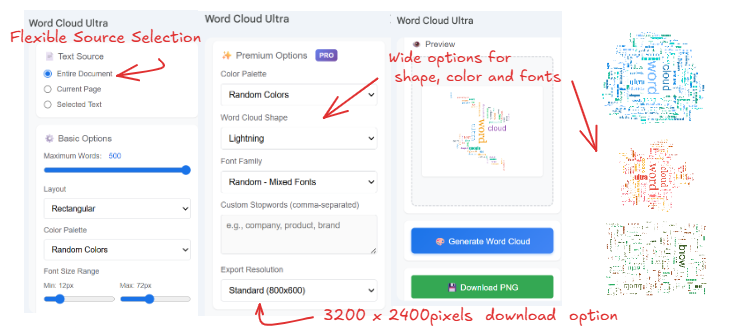
Word Cloud Ultra provides comprehensive word cloud creation with flexible text source selection including entire document, current page, or selected text. Smart word frequency analysis automatically weights words by occurrence with intelligent stopword filtering. Real-time preview shows word cloud as settings are adjusted. Fast generation using optimized spiral placement algorithms creates professional layouts in seconds. Export to high-quality PNG images for use in presentations, reports, social media, and printing.
Premium Shapes and Layouts
Eight professionally designed shapes available: Cloud shape with organic overlapping bubbles for natural word clustering, Rectangular layout for traditional word cloud presentations, Circle shape for balanced radial word distribution, Star shape with five-pointed angular sections, Diamond shape with rotated square geometry, Oval shape with elliptical boundary for elegant layouts, Tree shape resembling Christmas tree or pine tree silhouette, Lightning bolt with zigzag pattern for dynamic energy. Each shape uses intelligent boundary detection to ensure words fit perfectly within the chosen form while maintaining readability and visual appeal.
Color Palette Selection & Background Styles
Eight professionally curated color palettes: Sunset warm palette with vibrant reds oranges yellows and warm tones perfect for energetic presentations and attention-grabbing visuals, Ocean cool palette featuring calming blues and teals ideal for professional corporate documents and serene themes, Forest earth tones with natural greens and browns for organic environmental and nature-related content, Pastel palette with soft gentle colors perfect for elegant sophisticated designs and subtle aesthetics, Monochrome palette with classic black gray and charcoal tones for timeless professional appearance and print-friendly documents, Neon electric hues for dark backgrounds, Duotone blending indigo and coral, and a Vibrant Mix of diverse colors for dynamic eye-catching visualizations. Enhance your designs further with six background styles, including classic white, off-white, warm cream gradients, slate blue, deep night, and midnight radial gradients.
Typography and Font Options
Premium font selection includes 10+ professional typefaces: Arial for clean modern sans-serif appearance, Georgia for elegant serif readability, Times New Roman for traditional formal documents, Courier New for typewriter monospace effect, Verdana for screen-optimized clarity, Comic Sans MS for casual friendly tone, Impact for bold attention-grabbing headlines, Trebuchet MS for humanist sans-serif warmth, Palatino for classic book-style elegance, Garamond for refined traditional typography. Font size control with adjustable minimum (8-30px) and maximum (40-120px) ranges allows precise control over word emphasis and cloud density. Mixed orientation feature enables vertical and horizontal word placement for dynamic layouts.
Text Analysis and Processing
Advanced word frequency analysis with comprehensive English stopword filtering automatically excludes common words like articles prepositions and conjunctions. Custom stopword lists allow exclusion of organization-specific terms, product names, or repeated phrases. Adjustable word count from 20 to 500 words lets users focus on most important terms or create comprehensive visualizations. Text normalization removes punctuation numbers and special characters for clean processing. Case-insensitive matching groups variations of same word together. Minimum word length filtering excludes two-letter or shorter words for meaningful results.
Export and Resolution Options
High-resolution export capabilities support multiple resolutions: Standard resolution 800x600 pixels for web use and digital sharing, High resolution 1600x1200 pixels for presentations and documents, Premium resolution 3200x2400 pixels for professional printing and large displays. PNG format export with transparent or white background options. Downloaded images maintain aspect ratio and visual quality. Export includes optimized file size for easy sharing while preserving detail. Resolution scaling maintains font clarity and color accuracy across all export sizes.
Text Source Flexibility
Multiple text extraction options: Entire Document mode analyzes all text in Google Doc from beginning to end for comprehensive word cloud generation, Current Page mode extracts approximately 20 paragraphs around cursor position to represent visible page content, Selected Text mode processes only user-highlighted text for focused analysis of specific sections. Automatic text cleaning removes headers footers page numbers and formatting artifacts. Paragraph-aware processing maintains context while extracting words. Smart cursor detection identifies current location for page-based extraction.
Smart Word Placement Algorithm
Optimized spiral placement algorithm positions words efficiently: Starts from center and spirals outward for balanced distribution, Collision detection prevents word overlap for readability, Boundary checking ensures words stay within shape constraints, Adaptive spacing adjusts based on word size and density, Rotation support for mixed horizontal and vertical orientation, Fallback positioning for difficult-to-place words, Performance optimized for fast generation even with 500 words. Shape-specific positioning adjusts algorithm parameters based on selected form.
User Interface and Experience
Clean modern sidebar interface integrated seamlessly with Google Docs. Responsive design works on desktop and tablet devices. Organized sections for text source selection basic options and premium features. Live preview updates as settings change showing real-time results. Intuitive controls with sliders for numeric values and dropdowns for options. License status badge shows current plan and remaining trial days. Error messages provide helpful guidance for troubleshooting. Success notifications confirm generation and download completion. Loading indicators show progress during word cloud creation.
Licensing Model and Trial
Free tier provides basic word cloud generation with 100 word maximum, standard 800x600 resolution, rectangular shape only, random color palette, and Arial font. Three-day free trial unlocks all premium features with no credit card required. Premium license purchased through Buy Me a Coffee integration at bmc.numbrate.com provides a 1-year license to all features. 1-year license model with no recurring subscriptions. License verification through secure email-based key system. Multiple device support with email-locked activation. Regular feature updates and improvements included with license.
Educational Applications
Students use Word Cloud Ultra to analyze essay themes identify overused words visualize research paper topics create presentation graphics summarize reading materials develop study guides highlight key concepts and improve vocabulary awareness. Teachers employ word clouds to introduce lesson topics engage students visually assess comprehension create classroom displays analyze student writing provide feedback visualizations and design educational materials. Perfect for literature analysis history timelines science vocabulary and social studies themes.
Business and Professional Use Cases
Business professionals utilize word clouds for meeting minutes visualization customer feedback analysis market research summaries presentation enhancements report graphics brainstorming sessions brand messaging and competitive analysis. Marketing teams create social media graphics blog featured images campaign visualizations brand identity explorations content themes and infographic elements. Consultants use word clouds for client presentations stakeholder communications strategic planning workshops and executive summaries.
Research and Academic Publishing
Researchers leverage word clouds for literature review visualization keyword identification theme analysis conference poster creation abstract summaries methodology descriptions findings presentation and publication graphics. Academic applications include dissertation topic visualization journal article keywords research proposal themes grant application summaries and scholarly communication. Particularly useful for qualitative research thematic analysis content analysis and exploratory data visualization.
Creative and Design Applications
Writers and bloggers use word clouds to analyze content patterns identify writing habits create featured images design book covers visualize story themes develop character profiles analyze dialogue patterns and generate creative inspiration. Graphic designers employ word clouds for mood board creation brand exploration typography inspiration layout ideation color scheme development social media templates and creative brief visualization.
Installation and Setup
Available through Google Workspace Marketplace for Google Docs. One-click installation with standard add-on permissions. Automatic integration appears in Google Docs Add-ons menu. Initial setup includes license status check and optional trial activation. User-friendly sidebar opens from add-ons menu with Open Sidebar command. No external accounts or additional software required. Works entirely within Google infrastructure for security and privacy. Regular automatic updates deliver new features and improvements.
Performance and Technical Specifications
Optimized JavaScript algorithms for fast word cloud generation typically completing in 2-3 seconds for 100 words. Canvas-based rendering supports smooth preview updates and high-quality exports. Efficient memory usage handles documents with thousands of words. Browser-compatible code works across Chrome Firefox Safari and Edge. Mobile-responsive design adapts to different screen sizes. HTML5 canvas element ensures cross-platform compatibility. Client-side processing protects document privacy with no external data transmission.
Privacy and Data Security
All word processing occurs locally within Google Apps Script environment. No external servers receive document content. Text analysis happens in browser with no data transmission. License verification uses secure encrypted connections. No user tracking or analytics beyond license validation. Document content never leaves Google infrastructure. GDPR and privacy regulation compliant architecture. User data not shared with third parties. Optional email notifications only for license management.
Support and Documentation
Comprehensive in-app tooltips explain each feature and setting. Contextual help messages guide users through word cloud creation. Error handling provides specific troubleshooting guidance. Email support available at numbrate@gmail.com for technical questions. Regular feature updates based on user feedback and requests. Terms of service and privacy policy available at numbrate.com. License management through Buy Me a Coffee portal. Community feedback incorporated into development roadmap.
Advanced Features and Customization
Font size range control allows precise adjustment of minimum and maximum word sizes for custom emphasis and density control. Mixed orientation toggle enables vertical word placement rotated 90 degrees for dynamic layouts and space efficiency. Custom stopword entry field accepts comma-separated lists for organization-specific filtering. Word count slider provides granular control from 20 to 500 words. Shape selection dropdown offers eight distinct layout options. Color palette chooser includes six themes plus random option. Font family selector provides access to premium typography collection.
Future Development and Roadmap
Planned features include custom color picker for brand-specific palettes, word manual positioning for precise layouts, export to SVG format for vector graphics, multiple word clouds in single document, saved preset configurations, batch processing for multiple documents, additional shape options based on user requests, animation effects for presentations, and integration with Google Slides. Community feedback shapes development priorities through user surveys and support requests.
 Word Cloud Ultra