⚠️ IMPORTANT: Understanding Protection Scope
What TextEncrypt Protects:
- ✓ Hides content from READERS (read-only access)
- ✓ Protects exported/downloaded document copies
- ✓ Secures current text values in screenshots
Critical Limitation:
- ⚠️ Users with EDITOR access can ALWAYS view edit history
- ⚠️ Original unencrypted text visible in version history
- ⚠️ Only grant editor access to fully trusted users
- ⚠️ Only the document OWNER can encrypt/decrypt text
Recommendation: Use TextEncrypt for reader privacy. This
is protection designed for controlling who can see data in VIEW mode, not for securing data from
editors.
Key Security Features
🔐
Password-Based Encryption
Your password is stretched with 10,000 rounds of SHA-256 and a unique per-document salt. No stored keys
- only you know the password.
🆔
Text-Specific Keys
Each text segment gets a unique encryption key derived from your password plus a UUID. Same
password, different keys per segment.
✓
HMAC Integrity Verification
Every encrypted text includes an HMAC signature to detect tampering or incorrect passwords during
decryption.
⏱️
Session Password Caching
Enter your password once and work for 6 hours. Cache automatically expires, or manually end
session anytime.
🎨
Highlight Features
Highlight all [ENCRYPTED-N] markers in your document (body, headers, footers and footnotes) with red
text and pink background for easy identification. Remove highlights anytime.
🧹
Orphan Data Cleanup
Built-in cleanup tool (with confirmation) removes stored data for markers you have deleted, keeping your
document's storage efficient and organized.
How TextEncrypt Works
Installation
- Open your Google Docs™ document
- Navigate to Extensions → Add-ons → Get add-ons
- Search for "TextEncrypt"
- Click Install and authorize the required permissions
- Refresh your document to see the TextEncrypt menu
🌐 View on Google Workspace Marketplace
Or visit directly:
workspace.google.com/marketplace/app/textencrypt/820459159384
Encrypting Text (Owner Only)
- Select the text containing sensitive data
- Click TextEncrypt → 🔒 Encrypt Selected Text
- Enter your encryption password (minimum 8 characters recommended) and confirm it
- Password is cached for 6 hours for convenience
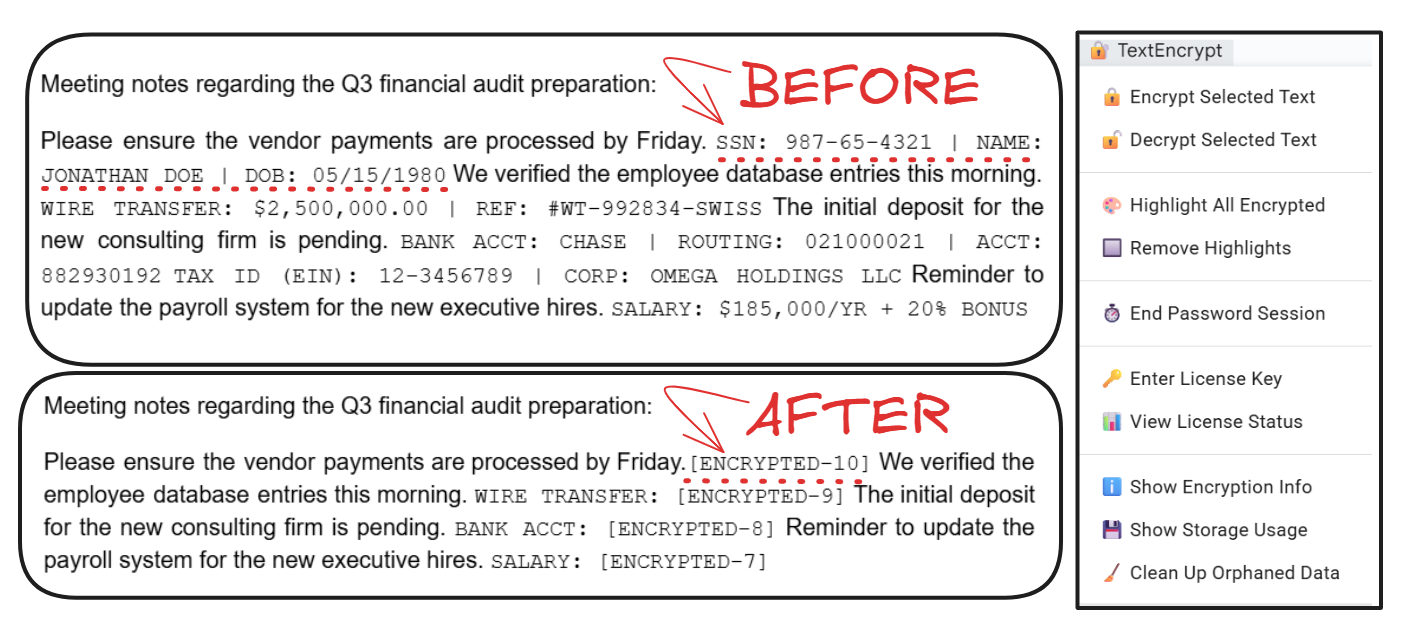
- Text will display a numbered marker such as
[ENCRYPTED-1] - the encrypted data is stored
with the document
Decrypting Text (Owner Only)
- Select text containing one or more
[ENCRYPTED-N] markers
- Click TextEncrypt → 🔓 Decrypt Selected Text
- If a password is cached you can reuse it (or enter it manually)
- Original text is restored (as plain text - re-apply any special formatting)
- Encrypted data removed from storage automatically
🔑 Password Management
Critical: Your password is NOT stored permanently. If you forget your password, you
can only recover clear text from change history.
Password Session Features:
- Password cached for 6 HOURS after first entry
- No need to re-enter during active session
- Use ⏱️ End Password Session to logout manually
- Session expires automatically after 6 hours
Tips:
- Use a strong, memorable password (8+ characters recommended)
- Store your password securely (password manager)
- Only the person who first encrypted in a document can encrypt/decrypt in it
🎯 Free Trial & Licensing
🆓 3-Day Free
Trial
Start using TextEncrypt immediately with full features!
No payment required. No credit card needed.
| Feature |
Free Trial (3 Days) |
After Trial / Free Forever |
Premium License |
| Encryption |
✓ Unlimited |
✗ Locked |
✓ Unlimited |
| Decryption |
✓ Unlimited |
✓ FREE Forever |
✓ Unlimited |
| Storage Limit (per document) |
1 KB |
1 KB |
450 KB |
| Password Sessions |
✓ 6 hours |
✓ 6 hours |
✓ 6 hours |
| Highlight Features |
✓ |
✓ |
✓ |
| Cleanup Tools |
✓ |
✓ |
✓ |
| License Duration |
3 Days |
- |
1 Year |
| Cost |
FREE |
FREE (Decryption Only) |
just $5 USD (1 Year) |
💡 How the
Licensing Model Works
TextEncrypt uses a fair, user-friendly licensing model:
- Free Trial: 3 days of full encryption + decryption access
- After Trial: Decryption remains FREE forever - you never lose
access to your encrypted data
- Premium License: Unlocks encryption again for 1 year
- Storage: 1 KB per document for trial/free users, 450 KB per document with Premium
(max ~9 KB per encrypted selection)
☕ Upgrade to Premium Account
Get premium features for just $5 USD and enjoy full access with a 1-year license!
How it works:
1. Pay $5 using your Google email
2. Wait 2-5 minutes for webhook processing
3. Get your license from bmc.numbrate.com with your email (the one used for Add-on)
4. Activate in TextEncrypt → 🔑 Enter License Key
5. Enjoy premium features!
Note: Storage is per document: 1 KB for trial/free users, 450 KB with Premium. Use
TextEncrypt → Show Storage Usage to monitor your usage. Decryption is always FREE!
Technical Security Details
Encryption Implementation
Key Derivation
Algorithm: Iterated SHA-256 with salt
Rounds: 10,000 iterations (master) + 100 (per-segment)
Salt: Unique per document
Segment Keys: Master key + UUID per segment
Encryption Method
Cipher: SHA-256 counter-mode stream cipher
IV: Random 16-byte initialization vector
Block Size: 32 bytes (SHA-256)
Format: V3:IV:Encrypted|HMAC|Signature
Data Integrity
Method: HMAC-SHA256
Keys: Separate per-segment HMAC key
Tampering: Detected before decryption
Version: V3 protocol identifier
Data Storage
Encrypted data is stored in the document's own add-on properties (Document Properties), not in the
visible text, so readers cannot access it. Each [ENCRYPTED-N] marker maps to its stored
segment. All storage is within Google's infrastructure - no external servers. Items encrypted with
earlier versions remain fully decryptable and are moved into the document automatically.
Session Security
Password cached in CacheService (user-specific, 6-hour expiration). Derived keys exist only during each
operation. No persistent storage of passwords or derived keys. Only the person who first encrypted in a
document can perform encryption/decryption operations in it.
Frequently Asked Questions
How do I get a Premium license after my trial ends?
Visit
buymeacoffee.com/numbrate or
Gumroad and purchase for just $5 USD.
Important: Use the same email address that you use with Google Docs.
After 2-5 minutes, retrieve your license key from
bmc.numbrate.com and activate it in
TextEncrypt → 🔑 Enter License
Key. This will unlock encryption for 1 year with 450 KB storage per document. (Note:
Decryption is always FREE)
Can editors see my encrypted data?
Editors can see the current encrypted state (text shows [ENCRYPTED-N]), but NOT the
original content - unless they check edit history. Important: Google Docs version
history will show all previous values including unencrypted data. Only share editor access with
fully trusted users.
What happens if I forget my password?
Encrypted data can only be recovered from history without the correct password. TextEncrypt uses
password-based encryption with no backup recovery mechanism. Always store your password securely in
a password manager.
How long does the password session last?
Password sessions last 6 hours from the time you enter your password. During this time, you can
encrypt/decrypt without re-entering the password. Use TextEncrypt → End Password
Session to manually clear the cache earlier.
Is encrypted data stored on external servers?
No. All encrypted data is stored in the document's own add-on properties (Document Properties). No data is
transmitted to external servers. Everything stays within Google's infrastructure.
What happens to encrypted data when I delete text?
Deleting an [ENCRYPTED-N] marker leaves "orphaned" encrypted data in storage. Use
TextEncrypt → Clean Up Orphaned Data to scan the whole document (body, headers,
footers, footnotes) and remove data for deleted markers. If you deleted a marker by mistake, restore
it with Undo or Version history before running cleanup.
Can multiple users encrypt different text with different passwords?
Only the person who first encrypts text in a document can encrypt/decrypt in that document. This
prevents conflicts and ensures consistent password management. Other users can view but not modify
encrypted content.
Does TextEncrypt work offline?
TextEncrypt requires an internet connection as it runs through Google Apps Script. All
encryption/decryption happens server-side within Google's infrastructure for security and
consistency.
How do I check my storage usage?
Click TextEncrypt → Show Storage Usage to see the current document's usage, percentage
of limit, number of encrypted segments, and remaining space. You'll receive warnings when
approaching 80% capacity.
Can I use different passwords for different text segments?
Yes. The add-on never stores your password, apart from the optional 6-hour session cache. We
recommend using the same password within a document; otherwise you need to remember which password
belongs to which [ENCRYPTED-N] marker to decrypt it later.
Professional Use Cases
Confidential Documents
Protect sensitive sections in contracts, agreements, and legal documents from readers while
maintaining document collaboration with trusted staff.
Personal Information
Secure personal data, contact details, and confidential notes in shared documents with family or
colleagues.
Business Plans
Encrypt financial projections, strategic details, and proprietary information in business
documents shared with stakeholders.
Research Notes
Protect participant data, confidential findings, and sensitive research information while
collaborating with research teams.
Meeting Minutes
Secure confidential discussions, personnel matters, and strategic decisions in shared meeting
documents.
Project Documentation
Protect API keys, passwords, and sensitive technical details in project documentation shared with
team members.
Protect Your Data Today
Start encrypting and securing sensitive text in your documents.
Get License Key
TextEncrypt: Professional Google Docs Text Encryption Add-on
TextEncrypt is a professional password-based encryption add-on for Google Docs that provides text-level data
protection using salted, iterated SHA-256 key derivation with HMAC integrity verification. This Google Workspace Marketplace
add-on allows document owners to encrypt sensitive text with password protection, preventing readers from
accessing confidential information while maintaining collaboration capabilities.
Key Features and Capabilities
Password-based encryption with 10,000 rounds of salted SHA-256 key stretching. Each text segment receives unique encryption keys derived from user password combined with UUID
identifiers. HMAC-SHA256 integrity verification ensures data tampering detection. Six-hour session caching
eliminates repeated password entry. Batch processing supports encrypting multiple text segments
in one selection. Orphan data cleanup tools maintain efficient storage management.
Security Implementation
TextEncrypt encrypts Google Docs text using salted, iterated SHA-256 key derivation and a SHA-256
counter-mode stream cipher with random 16-byte initialization vectors. HMAC-SHA256 verifies integrity
before decryption. All encrypted data stored in the document's own add-on properties within Google
infrastructure. No external servers involved ensuring complete data sovereignty.
Use Cases and Applications
Ideal for confidential document protection including contracts and legal agreements. Personal information
security with encrypted contact details and notes. Business plan protection with encrypted financial
projections and strategic information. Research data protection for participant data and confidential
findings. Meeting minutes security for confidential discussions and personnel matters. Project documentation
protection for API keys and sensitive technical details.
Storage and Licensing
Free 3-day trial includes full encryption and decryption with 1 KB storage per document. Premium license
provides 450 KB storage per document. After trial expires decryption remains FREE forever while encryption
requires premium license. Premium license unlocks encryption for a one-year duration. Upgrade
for $5 USD through Buy Me a Coffee or Gumroad integration. Webhook API verification system for automatic
license activation within 2-5 minutes.
Technical Specifications
V3 encryption protocol with format V3:IV:Encrypted|HMAC|Signature. Master key derivation with 10,000
iterations plus 100 iterations per segment. Unique salt per document. Random initialization vectors for each
encryption operation. Server-side processing through Google Apps Script requiring internet connection.
Only the first user who encrypts in a document can encrypt or decrypt there.
Privacy and Security Considerations
TextEncrypt protects data from readers and read-only users. Editor access limitations: users with editor
permissions can view version history containing unencrypted values. Only grant editor access to fully
trusted users. The first user who encrypts in a document exclusively controls encryption and decryption there. No password
recovery mechanism available - forgotten passwords require history restoration. Session security with
user-specific cache expiration after six hours.
Installation and Setup
Available on Google Workspace Marketplace. Installation through Extensions menu in Google Docs. Requires
authorization for current-document access. Automatic menu integration after installation. Password is
entered twice when encrypting. Minimum recommended password length of 8 characters.
Common Questions and Answers
How does TextEncrypt differ from document-level protection? TextEncrypt provides cryptographic encryption at
text level versus access control permissions. Can multiple users encrypt with different passwords? Only
the first user who encrypts in a document can encrypt or decrypt there, ensuring consistent password management. What happens when text is
deleted? Orphaned encrypted data remains until cleanup tool execution. Is offline usage supported? Requires
internet connection for server-side Google Apps Script execution.
Compatibility and Integration
Compatible with all Google Docs documents in Google Workspace and personal Google accounts. Works in
desktop browsers including Chrome Firefox Safari Edge (Google Docs mobile apps do not support add-ons).
Integration with Google Drive file sharing permissions. Encrypted text is shown as numbered
[ENCRYPTED-N] placeholders; decrypted text is restored as plain text.
Performance and Optimization
Optimized batch processing for multiple text segments in a single selection. Efficient storage calculation
based on encrypted data size. Real-time storage usage monitoring through Show Storage Usage feature.
Automatic warning notifications at 80% capacity threshold. Session-based password caching reduces
cryptographic operation overhead during active usage periods.
Support and Documentation
Technical support available through numbrate@gmail.com email. Comprehensive documentation covering
installation encryption decryption procedures. FAQ section addressing common use cases and troubleshooting.
Premium support included with paid license upgrades. Regular updates and security patches through Google
Workspace Marketplace automatic distribution.
 TextEncrypt