Sensitive Data Dedector: Real-Time Sensitive Data Detection for Google Sheets and Google Docs
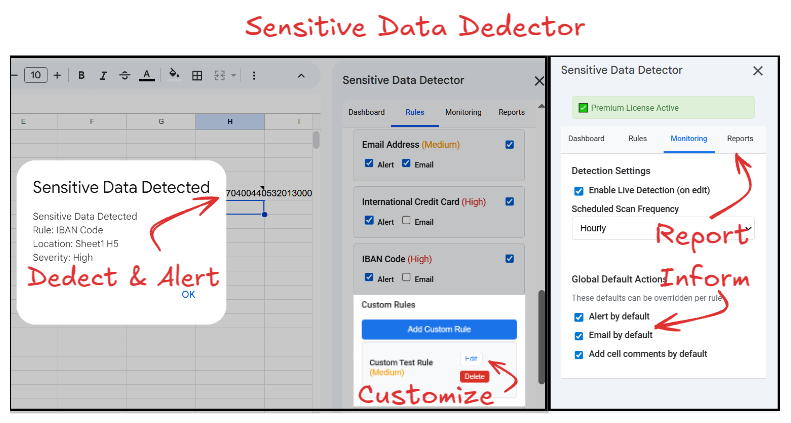
Sensitive Data Dedector is a professional Google Workspace add-on that provides real-time detection and alerting for sensitive information in Google Sheets and Google Docs. This comprehensive data loss prevention tool automatically identifies personally identifiable information (PII), financial data, healthcare identifiers, and custom sensitive patterns using advanced regex validation and smart alert technology.
Comprehensive Sensitive Data Detection Capabilities
Real-time live detection monitors Google Sheets as data is entered with automatic triggering. Smart detection technology uses fingerprinting to track previously detected data and only alerts on new detections, eliminating alert fatigue from repetitive notifications. Scheduled scanning options include hourly daily and weekly automated scans that run in background without requiring documents to remain open. Manual on-demand scanning available for immediate comprehensive analysis.
Built-In Detection Patterns and Validators
US credit card number detection for Visa Mastercard American Express and Discover with Luhn checksum validation. Social Security Number SSN detection with format validation and area code verification. US phone number detection using North American Numbering Plan NANP with 10-digit format and area code validation. Employer Identification Number EIN detection for US tax identification. International Mobile Equipment Identity IMEI detection with Luhn validation. Integrated Circuit Card Identifier ICCID and International Mobile Subscriber Identity IMSI detection for SIM cards. Drug Enforcement Administration DEA number detection with checksum validation. International Bank Account Number IBAN detection with country-specific format and checksum validation. Society for Worldwide Interbank Financial Telecommunication SWIFT code detection with BIC format validation. Email address detection supporting multiple formats including comma-separated lists and standalone addresses. IP address detection for both IPv4 and IPv6 formats. US driver license detection with state-specific format validation covering all 50 states.
Advanced Alert and Notification System
Multi-channel alerting includes in-app notifications, email alerts for new detections only, and automatic cell comment warnings in Google Sheets. Configurable severity levels categorize detections as High Medium or Low priority for triaged response. Flexible alert configuration with global defaults and per-rule override capabilities. Visual highlighting applies yellow background to detected sensitive data in Google Docs. Cell comment automation adds warning messages to Sheets cells containing sensitive information. Email notifications use smart detection to prevent duplicate alerts for previously identified data.
Custom Detection Rules and Pattern Management
Create custom regex-based detection rules for organization-specific sensitive data patterns. Configure rule-specific validation functions for advanced pattern matching. Set individual severity levels and alert preferences per custom rule. Enable or disable individual detection rules without deletion. Built-in detection patterns automatically update with improvements while preserving user settings and customizations. Import and export custom rule sets for sharing across documents or teams.
Comprehensive Logging and Reporting
Detailed detection logs track timestamp, location coordinates (cell reference or paragraph), detected pattern type, severity level, and fingerprint hash. Automatic deduplication prevents duplicate log entries from multiple trigger fires. Smart log management keeps only latest detection per cell or location. CSV export functionality for external analysis and compliance reporting. Log pruning tools remove old or duplicate entries to maintain storage efficiency. Real-time dashboard displays monitoring status and new detection counts from last scan.
Google Sheets Specific Features
Live detection through onEdit triggers monitors data entry in real-time. Scheduled scanning supports hourly daily and weekly automated background scans. Cell comment warnings automatically add detection alerts to flagged cells. Comprehensive logging system tracks all detections with full metadata. Reports and analytics provide insights into detection patterns and trends. Detection logs stored in dedicated sheet tab for easy access and review. Background scanning continues even when spreadsheet is closed.
Google Docs Specific Features
Scheduled scanning available for hourly daily and weekly automated detection. Manual scan on-demand for immediate document analysis. Visual highlighting applies yellow background to all detected sensitive data. Email alerts for new detections only using smart fingerprinting. Custom rule support allows organization-specific pattern detection. Smart detection prevents repeat alerts for previously identified content. All detections sent via email notification with pattern details and document location.
Smart Detection Technology and Fingerprinting
Fingerprinting system creates unique hash identifiers for each detected sensitive data instance. Detection tracking maintains history of previously identified patterns. New detection identification compares current scan results against fingerprint database. Alert suppression prevents notifications for data that has been previously detected and reported. Example workflow: first scan finds 5 email addresses and generates alert, subsequent scans finding same 5 addresses generate no alerts, when user adds 1 new email address system alerts only for the new detection. Fingerprint persistence ensures detection history maintained across multiple scanning sessions.
Validation and Accuracy Features
Luhn checksum algorithm validates credit card numbers IMEI identifiers and other checksummed patterns. Format verification ensures detected patterns match expected structure and composition. Area code validation for phone numbers and SSNs confirms valid geographic codes. Country-specific validation for IBAN and SWIFT codes ensures international banking identifier accuracy. State-specific validation for US driver licenses confirms format matches issuing state requirements. Custom validation functions allow advanced pattern matching beyond simple regex. False positive reduction through multi-layer validation approach.
Licensing and Trial Information
90-day free trial includes full functionality with no credit card required. Trial period provides access to all detection patterns custom rules and alerting features. Post-trial licensing available through Buy Me a Coffee integration at bmc.numbrate.com. One-time license purchase provides ongoing access to all features and updates. License verification through webhook API system. Installation from Google Workspace Marketplace application ID 671267535209. Compatible with both Google Sheets and Google Docs within same license.
Installation and Configuration
Available through Google Workspace Marketplace for Google Sheets and Google Docs. Installation process requires standard Google Workspace add-on permissions. Initial setup wizard guides configuration of detection rules and alert preferences. Default detection patterns activated automatically upon installation. Custom rule creation available immediately after setup. Global alert settings configurable from main dashboard. Per-rule alert overrides allow granular notification control. Scheduled scan configuration accessible through add-on menu.
Security and Privacy Considerations
All detection processing occurs within Google infrastructure through Apps Script. No external server data transmission ensures data sovereignty. Detection fingerprints stored using secure hashing algorithms. Email alerts contain detection metadata without full content exposure. Logs stored within document properties for data locality. No third-party data sharing or external API calls. Compliance-friendly architecture supports HIPAA GDPR and other regulatory frameworks. User controls enable complete feature customization for security policies.
Performance and Scalability
Optimized scanning algorithms handle large spreadsheets efficiently. Batch processing capabilities for documents with thousands of cells. Background scanning runs without performance impact on document editing. Scheduled scans utilize Apps Script time-based triggers for reliable execution. Log management prevents storage bloat through automatic pruning. Fingerprint database optimized for fast lookup and comparison. Real-time detection minimal latency impact on spreadsheet performance.
Use Cases and Applications
Data loss prevention DLP for organizations handling sensitive information. HIPAA compliance monitoring in healthcare documentation and record keeping. PCI DSS compliance support for financial services and payment processing. Human resources protection for employee records salary information and SSN data. Legal document security for case files client information and confidential communications. Research data protection for participant identifiers and study information. Customer relationship management CRM data security for contact lists and account details. Financial planning protection for account numbers investment portfolios and tax documents.
Support and Documentation
Technical support available through numbrate@gmail.com email contact. Comprehensive in-app help documentation and tooltips. FAQ section addresses common configuration and usage questions. Terms of service and privacy policy available at numbrate.com. License management portal at bmc.numbrate.com. Regular updates and improvements deployed through Google Workspace Marketplace. Community feedback incorporated into feature development roadmap.
 Sensitive Data Dedector