 MobileRunner
Mobile-Friendly Script Execution for Google Sheets™
📱 Mobile Optimized
⚡ Quick Execution
🔧 Custom Scripts
MobileRunner
Mobile-Friendly Script Execution for Google Sheets™
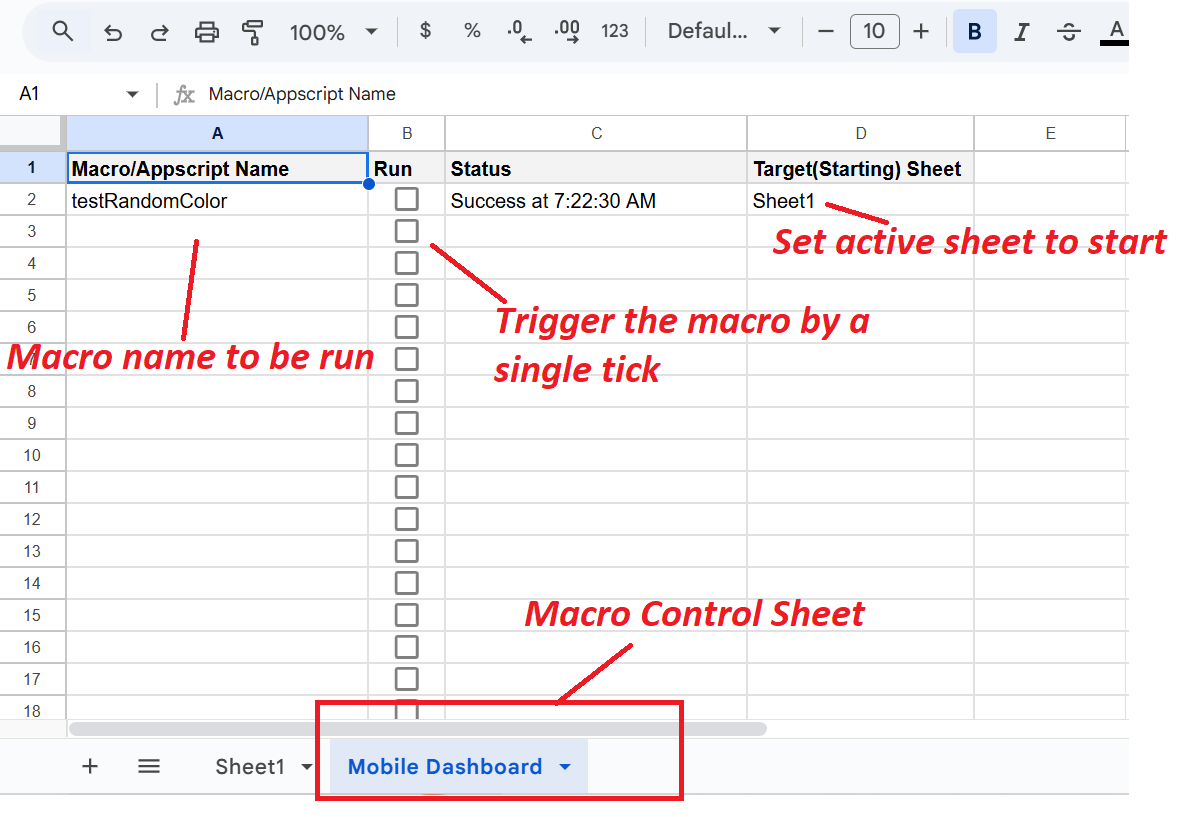
Execute your Google Sheets scripts from any mobile device with a touch-optimized interface.
Run custom scripts instantly without navigating through complex desktop menus.
Execute your automation scripts, data processing, and custom workflows on-the-go.
Perfect for field work, remote updates, and managing sheets while away from your desk.
After the trial ends, a valid license key is required to continue using MobileRunner. License keys are email-specific.
License format:
XXXXXX-XXXXXXXXXX-XXXXXX
🌐 View on Google Workspace Marketplace
Or visit directly: https://workspace.google.com/marketplace
Support development and unlock continuous mobile access after the trial.
Get LicenseMobileRunner is a specialized Google Sheets add-on that enables mobile-optimized script execution directly from smartphones and tablets. This Google Workspace Marketplace application provides touch-optimized interface for running custom Google Apps Script functions, automation workflows, and data processing tasks from mobile devices without desktop access requirements.
One-tap script execution launches custom Google Apps Script functions instantly from mobile interface. Touch-optimized controls designed specifically for smartphone and tablet interaction. Mobile-first design philosophy ensures optimal user experience on small screens. Quick access functionality eliminates complex desktop menu navigation. Responsive interface adapts seamlessly to various mobile device screen sizes and orientations. Native mobile app integration works within Google Sheets mobile application environment.
Execute custom Google Apps Script functions created for specific business workflows. Run automation scripts that process data transform values or generate reports. Data processing workflows execute complex calculations aggregations and transformations. Custom function library supports organization-specific business logic and operations. Workflow automation triggers multi-step processes with single mobile tap. Batch processing capabilities handle multiple operations in single execution cycle. Parameter-free execution designed for mobile simplicity without complex input requirements.
Field data collection enables on-site data entry with immediate script processing. Remote inventory management allows warehouse and retail staff to update stock levels from mobile devices. On-the-go report generation produces instant reports for management and stakeholders. Quick data refresh capabilities synchronize information from external sources while mobile. Mobile workflow automation streamlines field operations without laptop requirements. Real-time data updates ensure information accuracy during remote work sessions. Location-independent operations support business continuity from any geographic location.
Sales team automation executes order processing customer updates and CRM synchronization from field locations. Service technician workflows update job status equipment maintenance and customer service records. Delivery and logistics operations process route updates package tracking and delivery confirmations. Construction and project management teams update project status resource allocation and timeline tracking. Healthcare field workers process patient data appointment scheduling and care coordination. Real estate agents execute property updates showing schedules and client communication workflows.
Touch-optimized buttons sized appropriately for finger interaction on touchscreens. Simplified navigation eliminates complex menu structures unsuitable for mobile devices. Visual feedback confirms script execution status and completion. Error messaging displays clearly on mobile screens with actionable guidance. Loading indicators show execution progress for longer-running scripts. Success confirmations provide immediate verification of completed operations. Landscape and portrait orientation support ensures usability regardless of device positioning.
Native integration within Google Sheets mobile application for iOS and Android devices. Extensions menu access provides familiar interaction pattern for mobile users. Sidebar interface utilizes available screen space efficiently on mobile devices. Background execution allows scripts to run while user continues other mobile tasks. Sheet access permissions inherit from Google Sheets mobile security model. Offline capability considerations for script execution in low-connectivity environments. Multi-spreadsheet support allows script execution across different mobile-accessed sheets.
Inventory management mobile teams update stock counts reorder points and warehouse locations during physical counts. Sales order processing field sales representatives create orders apply discounts and confirm transactions during client visits. Event management staff execute attendee check-in badge printing and real-time capacity updates from mobile devices. Quality control inspectors process inspection results compliance checks and defect reporting from production floor. Retail store management executes daily sales reports inventory adjustments and staff scheduling from mobile. Restaurant and hospitality operations process reservation updates menu changes and supplier orders from handheld devices.
Data validation scripts verify entry accuracy completeness checks and format compliance on mobile-entered data. Calculation scripts perform complex mathematical operations financial computations and statistical analysis. Formatting scripts apply conditional formatting data organization and visual presentation rules. Import and export operations transfer data between sheets external systems and cloud storage. Email notification scripts send automated alerts reports and confirmations based on mobile-triggered actions. API integration scripts connect to external services web services and third-party platforms. Database operations query update and synchronize information with backend systems.
Optimized execution minimizes mobile data usage and battery consumption during script operations. Efficient processing handles large datasets without overwhelming mobile device resources. Timeout protection prevents excessive execution duration on resource-constrained mobile devices. Error recovery mechanisms handle network interruptions and connectivity issues gracefully. Retry logic attempts failed operations automatically when connectivity restored. Progress tracking provides execution status updates during longer-running mobile scripts. Performance monitoring ensures responsive user experience across various mobile device specifications.
OAuth authentication leverages Google account security for mobile access authorization. Permission inheritance respects Google Sheets sharing and edit permissions on mobile devices. Script authorization requires explicit user consent before first mobile execution. Encrypted communication protects data transmission between mobile device and Google servers. Access logging tracks script execution events for audit and compliance purposes. Role-based execution can restrict certain scripts to authorized mobile users only. Session management maintains secure authentication across multiple mobile executions.
90-day free trial provides full mobile script execution functionality without restrictions. Trial period begins immediately upon installation from Google Workspace Marketplace. No credit card required for trial activation ensuring risk-free evaluation. Post-trial licensing requires valid license key for continued mobile operations. Email-specific license keys tied to user Google account for authentication. License format follows XXXXXX-XXXXXXXXXX-XXXXXX validation pattern. Purchase through Buy Me a Coffee integration at bmc.numbrate.com. One-time payment model without recurring subscription fees. Webhook API verification validates license status automatically. License portability allows usage across multiple mobile devices with same email account.
Google Workspace Marketplace installation compatible with Google Sheets mobile app requirements. Standard add-on permissions required for script execution capabilities. Initial setup configures available scripts and mobile interface preferences. Script discovery automatically detects custom functions available for mobile execution. Configuration wizard guides selection of frequently-used scripts for quick mobile access. Menu customization allows organization of scripts for optimal mobile workflow. Testing mode enables validation of scripts before production mobile deployment.
iOS compatibility supports iPhone and iPad devices running Google Sheets mobile application. Android support works across smartphone and tablet devices with Google Sheets app. Responsive design adapts to different screen sizes from small phones to large tablets. Browser-based access enables script execution from mobile web browsers as alternative. Progressive web app characteristics provide app-like experience in mobile browsers. Device-agnostic approach ensures consistent functionality across mobile platforms. Version compatibility maintained across Google Sheets mobile app updates and releases.
Morning inventory checks retail managers execute overnight sales reconciliation and restock calculations from mobile. Client meeting updates sales teams process meeting notes opportunity updates and follow-up tasks during or after appointments. Equipment maintenance technicians submit completed work orders parts usage and next service scheduling from job sites. Event attendance tracking conference staff process real-time attendee counts session popularity and catering adjustments. Expense approval managers review and approve employee expenses while traveling or away from desk. Emergency response procedures field teams execute crisis communication protocols and resource allocation from any location.
Desktop execution requires computer access limiting availability during mobile work. Mobile interface simplifies script selection compared to desktop menu navigation complexity. Touch optimization provides superior mobile experience compared to mouse-based desktop interface. Location independence enables script execution from anywhere compared to desk-bound desktop requirements. Quick access reduces steps compared to desktop Extensions menu navigation path. Specialized mobile design versus one-size-fits-all desktop interface approach. Field work suitability dramatically higher with mobile-optimized execution capabilities.
Real-time calculations process formulas and functions instantly from mobile trigger. Data transformation scripts convert formats clean data and standardize entries on mobile command. Aggregation operations summarize data calculate totals and generate statistics from mobile interface. Filtering and sorting scripts organize large datasets based on mobile-specified criteria. Conditional operations apply business rules logic and decision trees through mobile execution. Batch updates modify multiple cells rows or sheets with single mobile script activation. Import operations pull external data from APIs databases and cloud storage via mobile trigger.
Multi-user mobile access allows team members to execute shared scripts from various locations. Coordinated mobile operations enable distributed teams to process workflows collectively. Status updates visible to mobile users show script execution results and data changes. Notification integration alerts team members of mobile-triggered script completions and results. Shared script libraries provide consistent mobile access to approved organizational functions. Role-based mobile access controls which team members can execute specific scripts. Audit trails track which mobile user executed which scripts at what times for accountability.
Script favorites allow pinning frequently-used functions for instant mobile access. Recent execution history shows previously-run scripts for quick re-execution. Script descriptions provide mobile-friendly explanations of function purposes and effects. Confirmation dialogs prevent accidental mobile script execution with touch verification. Execution history logs maintain record of mobile script runs with timestamps and results. Quick retry functionality re-executes failed scripts after connectivity restoration. Script categories organize functions by department workflow or business process for mobile navigation.
Retail operations process point-of-sale data inventory movements and customer transactions from mobile. Healthcare workflows execute patient scheduling appointment confirmations and medical record updates from tablets. Manufacturing operations track production output quality metrics and equipment status from shop floor mobile devices. Logistics and transportation update delivery status route optimization and vehicle maintenance from driver mobile devices. Financial services process transaction approvals risk assessments and client portfolio updates from advisor mobile devices. Education sector manages student attendance grade entry and parent communication from teacher mobile devices. Hospitality industry handles reservation management guest services and facility maintenance from staff mobile devices.
Google Apps Script execution engine processes mobile-triggered functions server-side. Client-side mobile interface communicates with backend through Google APIs. Asynchronous execution model prevents mobile UI blocking during script processing. Progress callback mechanisms update mobile interface during long-running operations. Error handling returns meaningful messages to mobile users for troubleshooting. Resource management optimizes memory and processing for mobile device constraints. API rate limiting compliance ensures scripts respect Google Sheets service quotas.
Technical support available through numbrate@gmail.com email contact. Mobile-specific documentation covers touch interface usage and script configuration. FAQ section addresses common mobile execution questions and troubleshooting. Video tutorials demonstrate mobile workflow examples and best practices. Terms of service and privacy policy available at numbrate.com. License management portal at bmc.numbrate.com for mobile license administration. Regular updates enhance mobile compatibility and add new mobile-optimized features. User feedback from mobile users incorporated into feature development roadmap.