CellArchiver: Automated Cell Value History and Audit Trail System for Google Sheets
CellArchiver is a professional Google Sheets add-on that provides automated archiving of cell values over time with timestamped historical records. This Google Workspace Marketplace add-on enables organizations to build comprehensive audit trails, generate time-series data, and maintain snapshots of changing cell values through flexible scheduling automation and value-only copying mechanisms.
Core Archiving Functionality
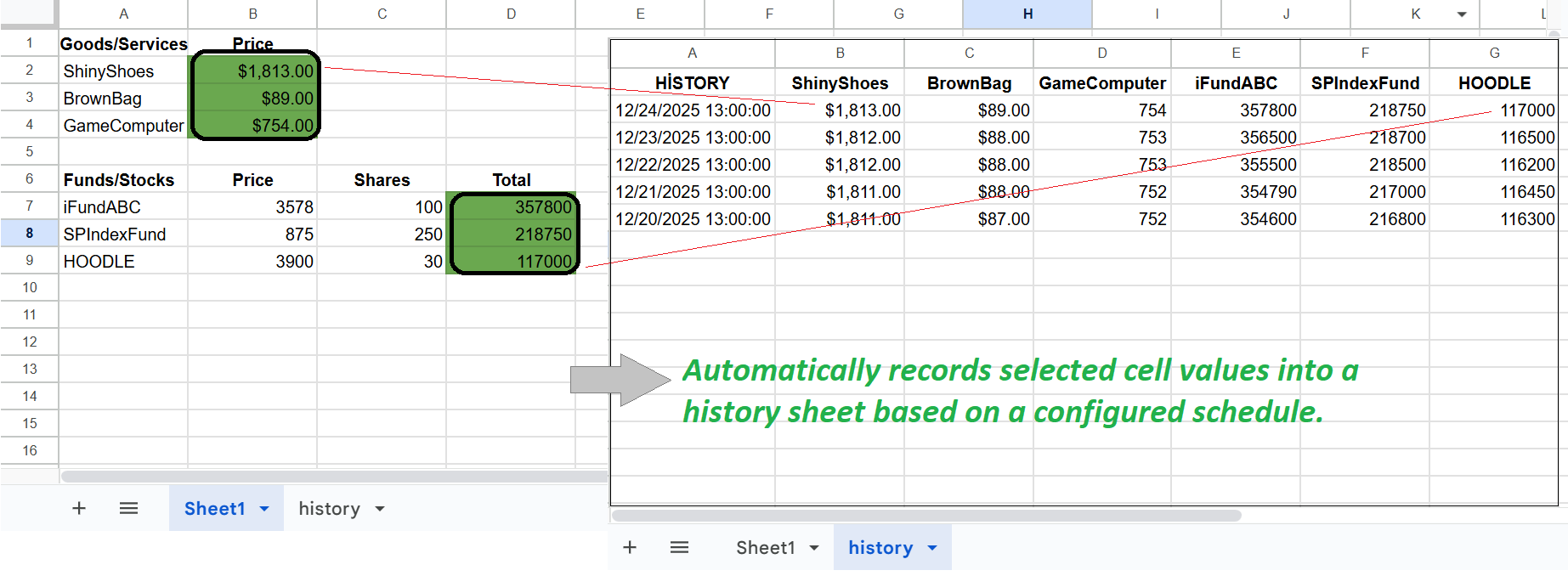
Value-only copying preserves cell values without formulas creating exact historical snapshots as displayed at execution time. Automated timestamping inserts new rows with precise execution timestamps for temporal tracking. Scheduled execution supports intervals of 30 minutes hourly daily and weekly automation. Historical record generation builds comprehensive audit trails over extended time periods. Time-series data creation enables trend analysis and temporal pattern recognition.
Scheduling and Automation Features
Flexible scheduling intervals include every 30 minutes for high-frequency monitoring, hourly execution for regular updates, daily archiving for end-of-day snapshots, and weekly captures for long-term trend tracking. Background automation runs scheduled tasks automatically without manual intervention. Time-based triggers use Google Apps Script scheduling for reliable execution. Automatic row insertion adds new timestamped records with each execution cycle. Unattended operation continues archiving even when spreadsheet is closed.
Audit Trail and Compliance Applications
Comprehensive audit logging tracks all value changes over time with timestamps. Compliance record keeping maintains historical data for regulatory requirements. Financial audit trails document portfolio values investment performance and account balances. Version history supplementation provides additional change tracking beyond native Google Sheets history. Tamper-evident records with timestamped entries support forensic analysis. Regulatory compliance support for industries requiring historical data retention including finance healthcare and legal sectors.
Financial and Investment Tracking Use Cases
Stock price monitoring archives real-time or delayed stock quotes at scheduled intervals. Fund price tracking maintains historical net asset values for mutual funds and ETFs. Portfolio performance tracking documents investment values over time for return calculations. Cryptocurrency price history captures volatile digital asset prices at regular intervals. Foreign exchange rate tracking archives currency conversion rates for international transactions. Commodity price monitoring tracks precious metals energy and agricultural commodity values.
Dashboard and KPI Monitoring
Key performance indicator archiving preserves dashboard metrics over time. Business intelligence history maintains snapshots of calculated KPIs and metrics. Sales performance tracking archives daily weekly or monthly sales figures. Website analytics history preserves traffic conversion and engagement metrics. Social media metrics archiving documents follower counts engagement rates and reach statistics. Marketing campaign performance tracks ROI metrics click-through rates and conversion data.
Time-Series Data Generation
Temporal data collection builds datasets for trend analysis and forecasting. Historical data accumulation enables longitudinal studies and pattern recognition. Statistical analysis support provides data for regression analysis and predictive modeling. Charting and visualization prepares time-series datasets for graphing and dashboard creation. Data export capability allows archived data to be used in external analytics tools. Research data collection gathers temporal observations for academic and commercial research.
Technical Implementation Details
Value extraction reads current displayed values from specified source cells. Formula exclusion copies calculated results not underlying formulas. Timestamp generation creates precise execution time records in ISO format. Row insertion adds new records to destination sheet without overwriting existing data. Source cell configuration allows flexible selection of cells to archive. Destination sheet specification directs archived data to dedicated history sheets. Schedule management configures timing intervals and execution frequency through Google Apps Script triggers.
Licensing and Trial Period
90-day free trial provides full functionality without restrictions or credit card requirement. Trial period begins immediately upon installation from Google Workspace Marketplace. Post-trial licensing requires valid license key for continued automated execution. Email-specific license keys tied to user Google account email address. License format follows XXXXXX-XXXXXXXXXX-XXXXXX pattern for validation. License purchase through Buy Me a Coffee integration at bmc.numbrate.com. Webhook API verification system validates license status automatically. One-time purchase model without subscription or recurring fees.
Installation and Configuration
Google Workspace Marketplace installation through application ID 958888816004. Standard Google Sheets add-on permissions required for execution. Initial configuration wizard guides source cell selection and destination sheet setup. Schedule configuration interface sets automation intervals and timing preferences. License activation process enters purchased key for post-trial operation. Menu integration adds CellArchiver commands to Google Sheets Extensions menu. Trigger setup establishes time-based automation through Apps Script infrastructure.
Data Storage and Organization
Dedicated history sheets store archived records separately from source data. Columnar organization maintains timestamp column plus archived value columns. Chronological ordering presents records in execution sequence from oldest to newest. Unlimited record capacity constrained only by Google Sheets row limits (10 million cells). Persistent storage ensures archived data remains accessible indefinitely. No external server storage with all data remaining within Google infrastructure. Sheet-based organization allows multiple archive destinations within single spreadsheet.
Performance and Scalability
Efficient execution handles large source cell ranges without timeout issues. Batch processing capabilities archive multiple cells in single operation. Optimized for high-frequency execution supporting 30-minute interval scheduling. Low overhead design minimizes impact on spreadsheet performance. Scalable architecture supports archiving dozens or hundreds of cells per execution. Background processing through time-based triggers ensures reliable operation. Error handling manages edge cases and API limitations gracefully.
Integration and Compatibility
Full Google Sheets compatibility works with all spreadsheet features and functions. Formula support archives calculated values from complex formulas. Data validation compatibility preserves dropdown and validation rules in source cells. Conditional formatting independence operates regardless of cell formatting. Cross-sheet references allows source and destination on different sheet tabs. Multi-user environment supports shared spreadsheets with collaborative editing. Mobile accessibility archives execute on schedule regardless of device access.
Professional Use Case Examples
Financial services portfolio tracking documents client investment values daily for performance reporting and compliance. Healthcare organizations maintain snapshots of patient census and resource utilization metrics for capacity planning. Retail businesses archive daily sales figures and inventory levels for trend analysis and forecasting. Manufacturing facilities track production output quality metrics and downtime for operational analytics. Real estate companies monitor property values rental rates and vacancy rates over time. Energy sector tracks commodity prices renewable generation output and consumption patterns. Educational institutions preserve enrollment statistics attendance rates and performance metrics for institutional research.
Comparison with Manual Methods
Manual copy-paste requires constant attention and prone to human error. CellArchiver automation eliminates manual intervention saving time and ensuring consistency. Native Google Sheets version history limited to 100 days while CellArchiver provides unlimited retention. Spreadsheet scripts require technical knowledge whereas CellArchiver offers user-friendly interface. Third-party automation tools may involve external servers while CellArchiver keeps data within Google ecosystem. Native pivot tables and charts require current data whereas archived records enable historical analysis.
Security and Privacy
All data processing occurs within Google infrastructure through Apps Script execution. No external server transmission ensures complete data sovereignty and privacy. Encryption in transit and at rest provided by Google Cloud Platform security. Access control inherits from Google Sheets sharing permissions and authentication. License validation through secure webhook API without exposing sensitive data. No third-party data sharing or external API dependencies. Audit trail integrity maintained through timestamped immutable records. Compliance with data protection regulations including GDPR and CCPA through Google's compliance framework.
Support and Documentation
Technical support available through numbrate@gmail.com email contact. Comprehensive user documentation covering installation configuration and usage. FAQ addressing common questions about scheduling licensing and troubleshooting. Terms of service and privacy policy available at numbrate.com. License management portal at bmc.numbrate.com for purchase and retrieval. Regular updates and improvements deployed through Google Workspace Marketplace. User feedback incorporated into feature development and enhancement roadmap.
 CellArchiver